Everything Ifarlo does

A CRM that builds itself, keeps itself current, and answers in plain English. Here is the full picture.

Setting up

AI CRM setup

Answer a few questions about your business in your own words. Ifarlo builds your CRM around the answers, the right objects, stages, fields and structure for how you actually work. No blank system to configure.

A structure that keeps improving

As you use it, Ifarlo notices what is missing and suggests improvements. Your CRM gets a better fit over time rather than slowly going stale.

Bring what you already have

Starting a new CRM should not mean starting with an empty one. Import from a CSV, an export from your old CRM, or a spreadsheet you have been keeping. Ifarlo handles people, companies, deals and past activity, up to 500,000 rows at a time. It also tells you the right order: people and companies first, because deals and activities link back to them. Activities match to the right person by email address. Every imported record is tagged to the import it came from, so a batch is easy to find again afterwards.

A CSV import mapped to people, companies, deals and past activity

Getting information in without typing it

Calendar connection

Connect Google or Microsoft and Ifarlo reads your upcoming meetings, prepares briefings, and logs each one automatically. It never reads your inbox.

Ifarlo connected to a Google calendar, reading upcoming meetings

Meetings log themselves

Every meeting in your calendar is logged as an activity against the right person, automatically. Your contact history builds itself, so when you open a record six months later the whole story is there, without anyone having typed it up.

Voice on mobile

Talk your notes in between meetings instead of typing them.

Email it your week

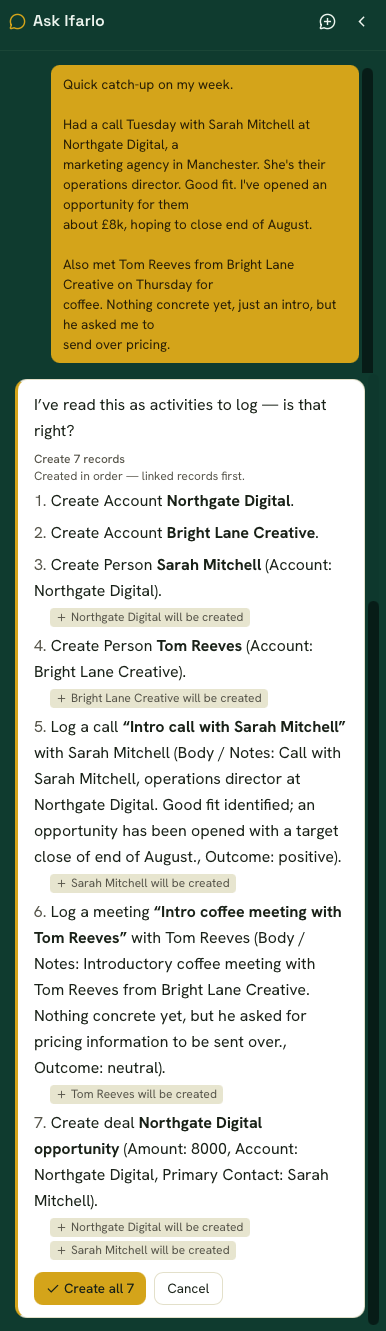
Send Ifarlo a note about your week in your own words, or forward an email. It reads it and creates the people, deals and activities for you to confirm.

An email about the week turned into people, deals and activities ready to confirm

Nothing lands without you

Everything Ifarlo works out is shown to you first, as a list you can edit, approve or throw away.

A list of records Ifarlo has worked out, waiting for confirmation

Getting information back out

Ask Ifarlo

A chat bar on every screen. Ask who has gone quiet, what is at risk, or for a brief before a meeting. You get an answer from your own data in a sentence or two, not a table to interpret.

Ask Ifarlo answering a question about a client record
Ask Ifarlo answering which clients to contact today

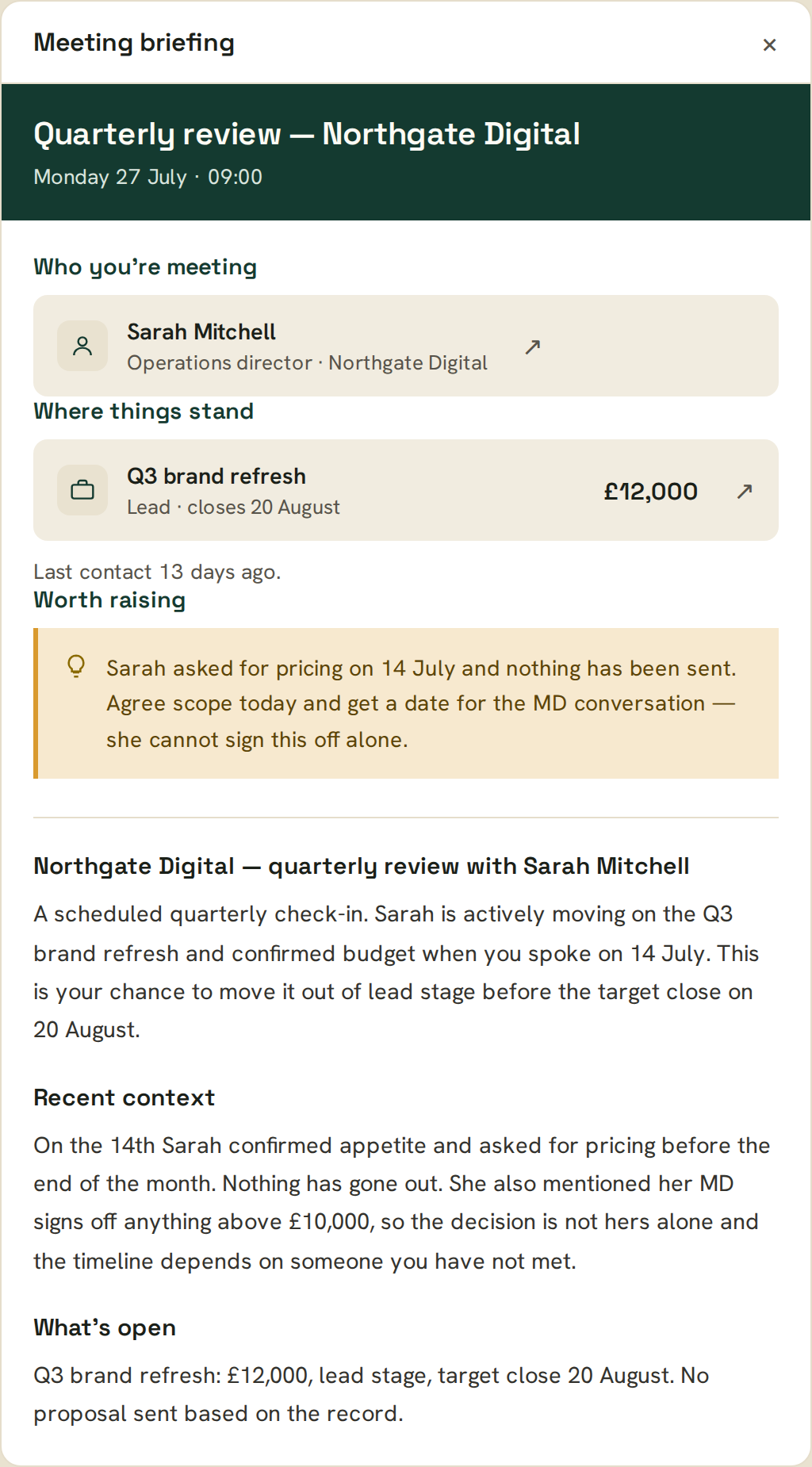
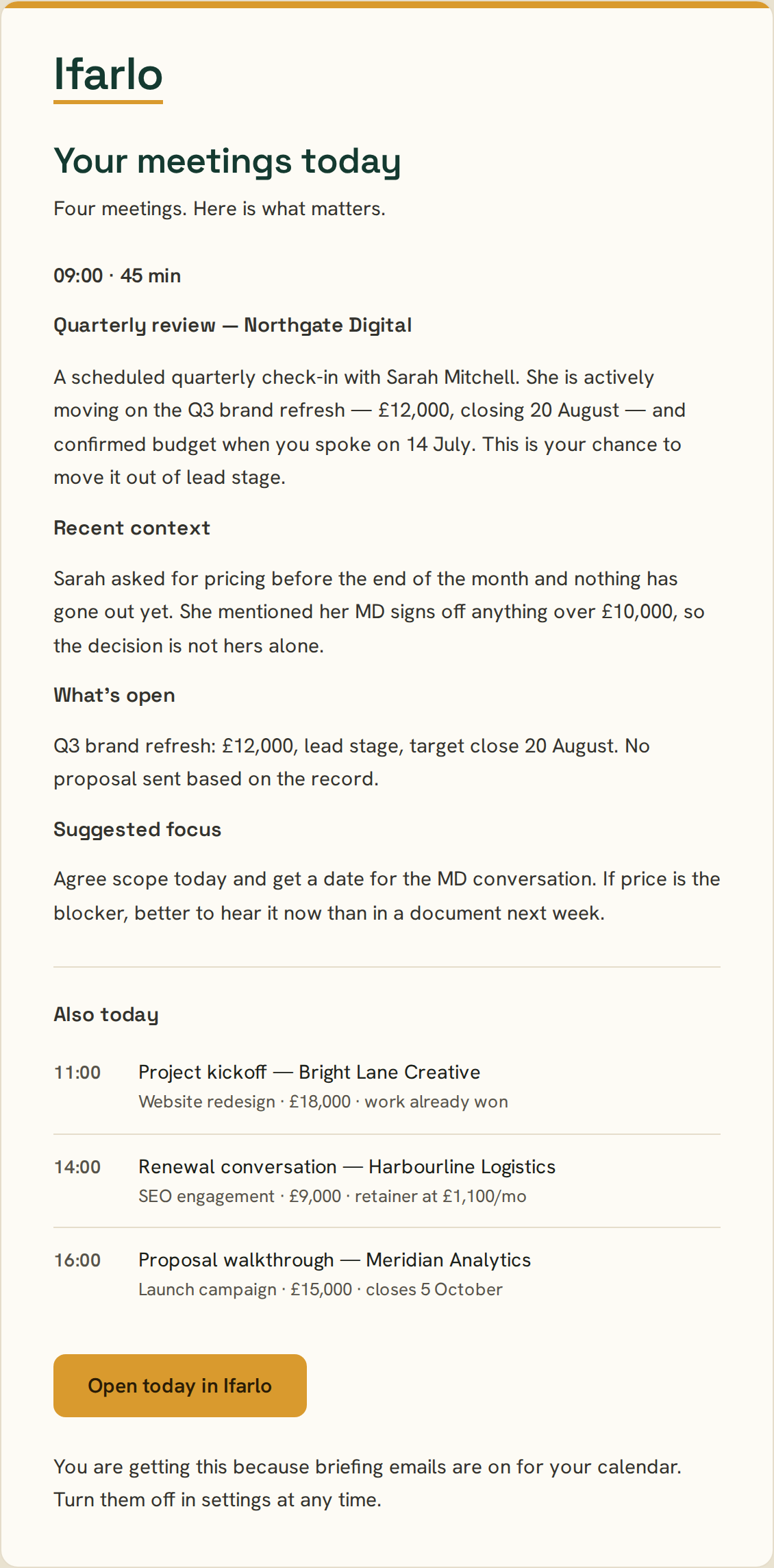
Meeting briefings

Before every meeting, a summary of the contact, recent activity, open deals and anything else worth knowing, in the app and in your inbox.

A pre-meeting briefing summarising a contact and open deals, shown in the app
The same pre-meeting briefing delivered by email

Connect from Claude

Link Ifarlo to Claude, the AI assistant you already use, and ask it about your clients and pipeline directly. Your CRM answers without you opening it.

Reporting

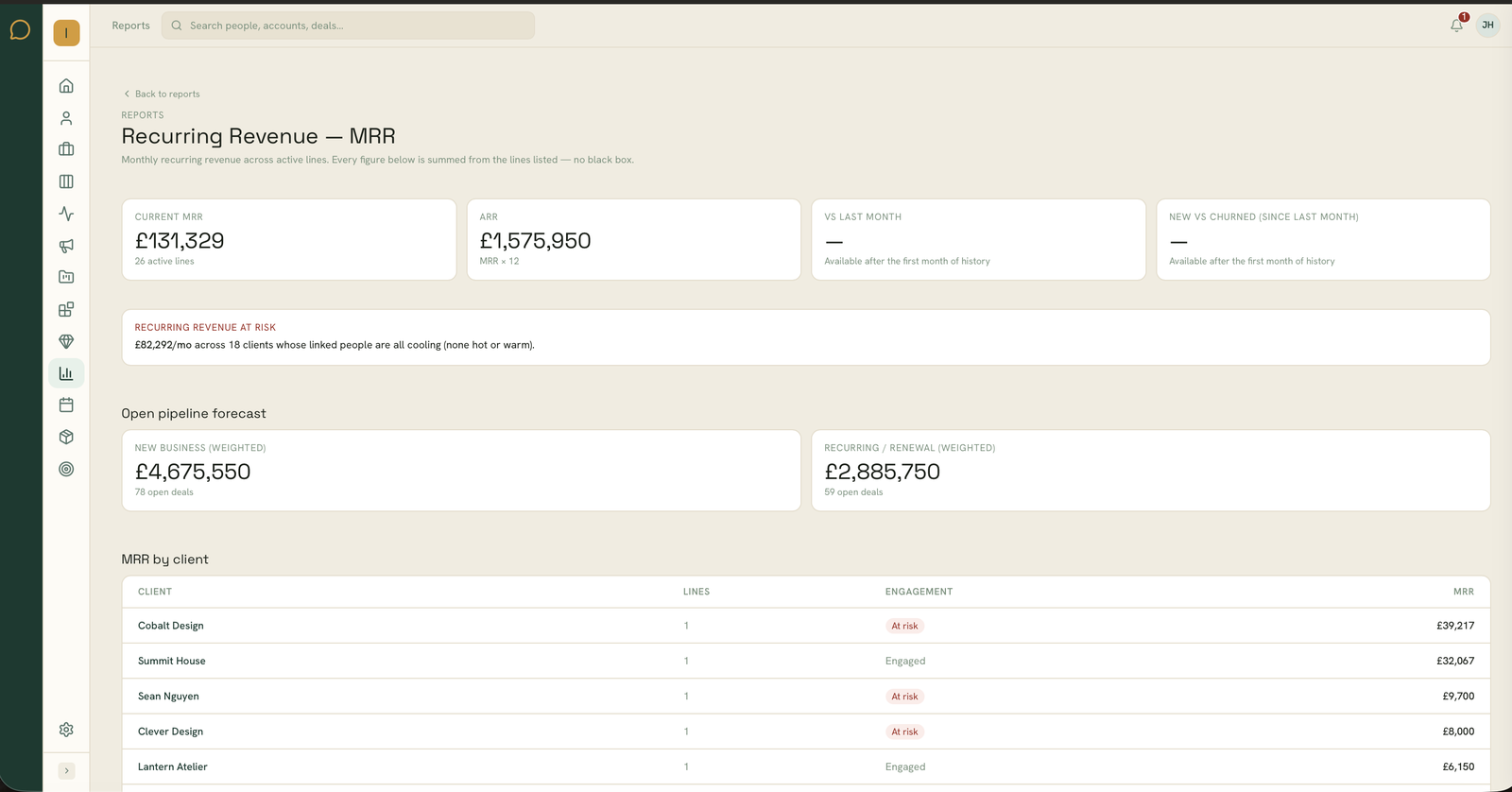
Recurring revenue, annual run rate, revenue at risk, and how engaged your whole contact base is. Every figure traces back to the records behind it.

Keeping on top of relationships

Engagement temperature

Every contact is scored hot, warm or cold based on real activity, so the ones cooling off are easy to spot.

Pipeline

Drag deals through your stages or work in a list. Open value, weighted value and totals update as you go.

Follow up email drafting

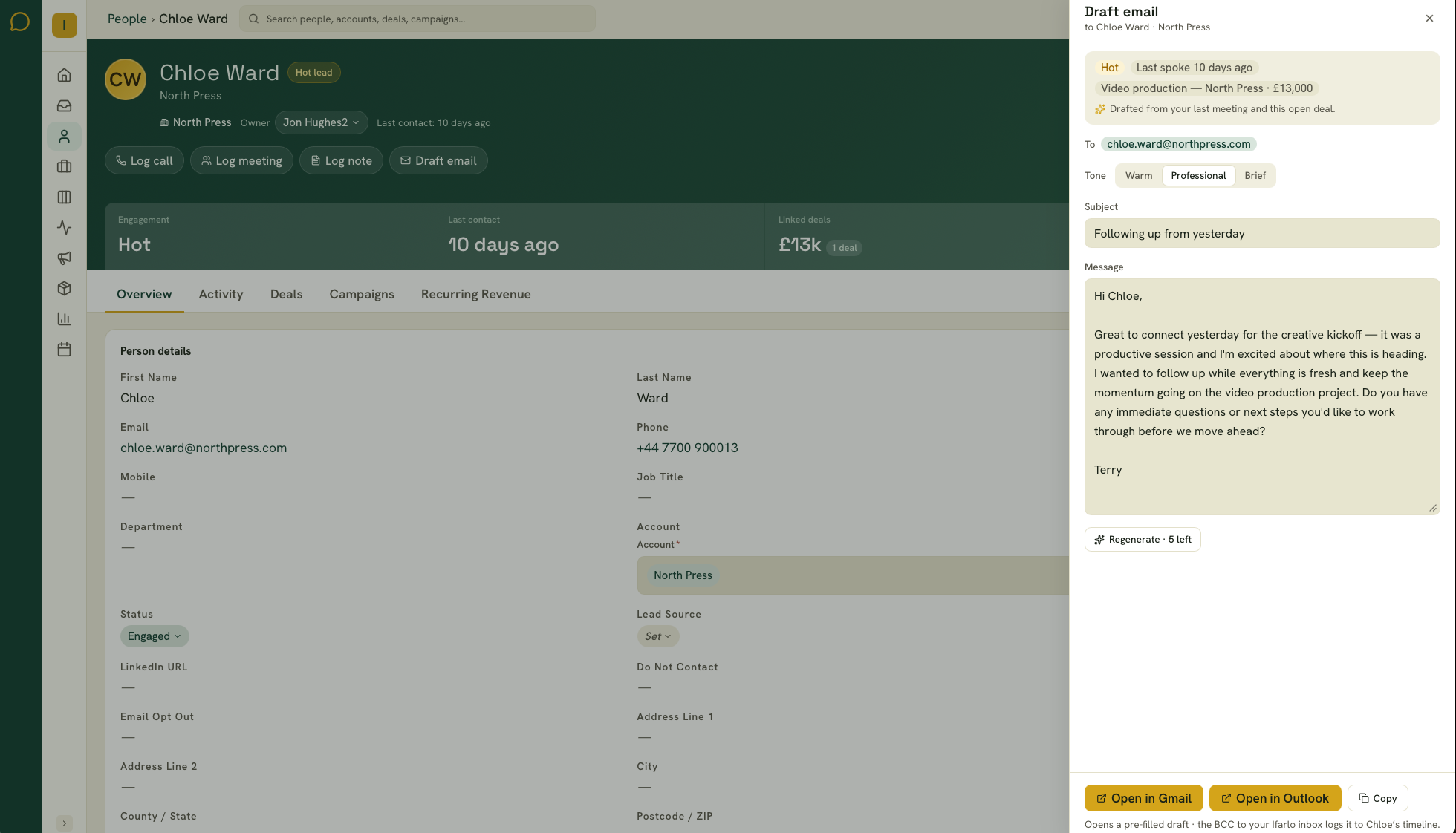
Ifarlo drafts the follow up after a meeting, personalised to what was actually discussed. Review it, change anything you want, and send: it goes out through your own Gmail or Outlook and appears in your Sent items. The email is logged against the contact automatically.

A drafted follow up email ready to review and send

Data quality detection

Stale records, missing information and duplicate contacts are flagged for you, so your data stays trustworthy without an audit.

Email campaigns

Send a broadcast to a segment of your contacts, with opens and results tracked back onto the records. Verify your sending domain once and campaigns go out from your own domain, the same setup any email tool asks for, and the reason your messages land rather than get filtered.

See it for yourself